


Matthew Duggan
- @MattyD797
- | He/Him


Hello WildLabs community!
I was curious if anyone had any experience or helpful insight into the following project I am working on with coral reef/land mapping interfaces in the program Agisoft Metashape. I have a couple objectives and would be grateful for your experience.
- How would you make a map where one could draw a line at a certain depth? For me, I want to know what corals are shallower than 15 feet. I know the tide that I took the depth measurements at and tide here is 60cm between low and high. Ideally I was thinking of something similar to a Digital Elevation Model (DEM) where I could see what corals are above a certain depth.
- What do you suggest as tools to use for mesh segmentation or marking of coral species? I've heard blender is a good tool for this, but would love to know if anyone was successful with this before diving into another program. In the below image I started going through the images at different points of the point cloud and just pin pointing all the species to get my bearings of where everything is. My thinking was if I could segment all the corals, I would know what is not segmented and get a percent coral coverage for this area or parts of this area.
- How would I make this model accessible for others to use or investigate? I was thinking of a cloud service like Agisoft Metashape's, but if there's more open source avenues I would love suggestions. Right now the model is around 50GB, so it seems quite large.
I did the following mapping using two techniques:
Drone-in air
1) I utilized a Mavic 2 Pro with Pix4Dcapture to map a selected area at a height of 30 meters (GSD-0.75 cm/px). Camera was at a 70 degree angle with a front overlap of 80% and 70% sideways. In this case a break water. From an older survey, I found 71 absolute GPS points mainly on either side of the breakwater on clear geological markers. Because of the ongoing construction in the center, there aren't really any ground control points which survived. I conducted a few reference measurements and it all appears to be within that 0.75 cm error. I wanted to map this to give a reference to someone above the water where they are on the reef.
ROV-in water
2) I utilized a BlueROV2 with a GoPro which took an image every 2 seconds at 2-3 meters above the bottom on a manually driven path with about 75-95% vertical and horizontal overlap. I just kept a constant speed and conducted my own double grid path. I later went in scuba diving with the same camera and took pictures of holes or missing parts. I originally tried to do structure from motion with a stereo camera setup, but it was way too computationally intensive for stitching that many images (week-2weeks of processing). I placed roughly 10 rulers marked at either end with masking tape 0-30cm and hand placed mushroom anchors for a vertical reference (20cm). These were more or less randomly placed near SPAW protected species. I used my dive watch to get the depth of different corals on the reef. A dive watch has an error rate of about 10cm above 10 meters depth.
Combining
I ran this all in Agisoft Metashape. So I imported all my photos (~100 on land and ~1500 in water), reference distances, and GCPs on land. I aligned the photos and then made a point cloud. Some photos from the drone were actually aligned with my underwater photos due to the clarity of the Caribbean. Because agisoft requires I have an XYZ for all my GCPs and I didn't have good GPS in the water, I used the model to note estimated GPS points and then reran the point cloud with known depth. This map is ~40 by 80 meters of area which extends to reefs at about 10 meters deep.
I'd love for any insight into what I did right and what I did wrong from this more experienced community. Maybe some good references. I think the model came out really cool and I'm hoping it can be utilized during the construction of the breakwater to be careful around SPAW protected and IUCN Red list species. However, for that to happen I need to be confident or at least know my errors. I feel quite new in this field and would love to know what I could do to make it better.
Thank you so much in advance!!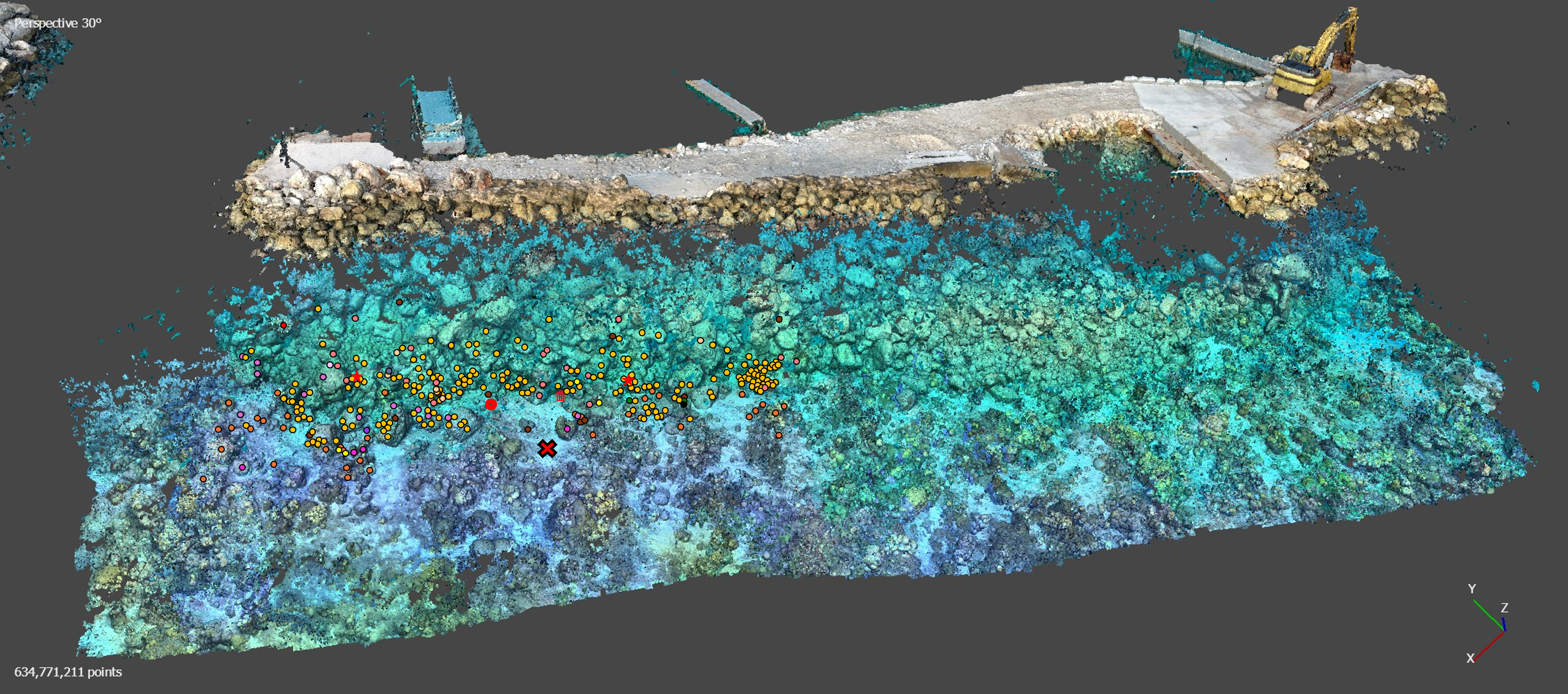
22 December 2024 8:35am
Hi Matthew
Wow, what an amazing project! It is incredible how you have managed to figure out some of the complexities of combining underwater imagery with UAV imagery. I am sure that was a fascinating learning experience.
I cannot help you with Points 1 and 3 but can suggest using Orfeo Toolbox for your segmentation process in Point 2. It integrates with QGIS and is open source. It will work with your UAV ortho maps if there is enough visible detail of the corals. You will be able to build and train your own model in order to accurately segment you reef. It takes a bit of know how to us the Machine Learning algorithms but once you get the hang of it it becomes immensely powerful. I will be building an online course on how to build your own machine learning processing algorithms in 2025 using this brilliant package. Once segmented you can save out the shapefiles and use them to segment and define your 3D point clouds in Agisoft.
Alternatively, look into using Picterra Geospatial AI. It is cloud based and much simpler to use but you may need to compress your imagery or point clouds in order to upload them given the file size you mentioned above. (Although they probable do allow for large uploads these days, I used Picterra in the past and it was brilliant!). Also i am not sure if it works with point clouds directly but have a look
I hope this helps. Great project!
Sean Hill