


Simon Kravis
- @SKravis
- | He/Him
Camera traps (or trail cameras) have become increasingly widely used for ecological studies of wildlife, as technology improvements in cameras and other hardware allow battery operated devices to record videos or sequences of still images during day or night when triggered by motion. Motion detection is commonly achieved using infra-red sensing, where a change in the balance of infra-red light scattered back from two halves of the viewed scene. Detection of naturally radiated infra-red light is sometimes described as passive infra-red, or PIR, sensing. A detection triggers recording of either a single still image, a sequence of them, or a video. This process might more accurately be described as heat detection, and employs the same sensors as are used in modern digital thermometers. Infra-red flash is used to obtain black and white images at night. Other motion detection methods include interruption of a beam of infra-red light connecting a source with a sensor Recorded data is written to a removable SD card, the capacities of which can now exceed I terabyte.
Although camera recording capacity is now very large, the recorded data needs to be analysed to detect the presence and identity of animals before it is useful. False positive detections, where the camera is triggered but there is no animal present in the scene, are common. They may be caused by moving vegetation or changes in temperature when the sun comes out or goes in. One popular brand of camera trap uses PIR sensing with an acceptance angle of about 30 degrees but notes that large animals are easier to detect than small ones, and that sensing works best when the animal is at a different temperature from its surroundings. As cold-blooded reptiles may not necessarily be warmer than their surroundings, they may be more difficult to detect using PIR sensing. Active sensing methods (such as the microwave methods used for automatic door control) may be preferable, but these would require more power and the limit the maximum period of unattended operation. A camera taking photos at regular time intervals might be preferable to a triggered device for gathering images of reptiles or small animals. This would create large data sets, but if combined with automated image analysis might be a viable alternative.
At first glance, animal detection in images would appear to be a problem easily solvable using computer vision methods. However, animal images will be different depending on they are seen from the side, face on or from behind, and a large number of training images of each view are required before an automated system achieves an acceptable level of precision and recall, and these may not be available. This problem, and several others are discussed by Yousif et al (2019). The massive data volumes recorded also require substantial computing power to produce results in a reasonable time. WildLife Insights is a global project to apply Artificial Intelligence (AI) to camera trap image classification and remove images which do not show animals, and to support collaboration. It offers downloads of camera trap data sets, but data sets not belonging to the user do not contain original image data, only the results of processing. Original data is only available to project participants.
The difficulties of automatic detection of animals in camera trap images encourage the use of human visual abilities in image analysis. Web-based systems utilising these abilities have been used successfully in other areas, notably for enhancing text extracted using Optical Character Recognition on scans of old newspapers by the National Library of Australia system Trove. Camera trap projects may operate by sharing image data amongst a number of human analysts, but these image data sets may contain thousands of images and be quite unwieldy to process. Recording images only with maximum resolution available on an analyst’s device would make the data sets more manageable. Images can be displayed for analysis on Windows in a number of ways. (Mac users have much smaller number of options available.)
Video Conversion
Videos are comprised of a series of images and conversion of a series of images to a video appears to be common requirement. There are numerous online services for this purpose, most of which advertise themselves as free, but have substantial limitations unless a license is purchased. Most video editing programs have a facility for this purpose, but conversion of thousands of images to a video may be quite time-consuming. The converted file may have a lower resolution than the input images
Although video is a natural format for a time-ordered sequence of camera trap images, a player is required which can play videos at a reduced speed – the standard speed of 30 frames/second is too fast for analysis. The default Windows video player Media Player does allow slower playback speeds of half and quarter-speed but for a video frame rate of 25 frames/sec, 6.25 frames/sec is still too fast for inspection of each frame, and there is no step facility. The well-known free video program VLC Player does offers variable speed playback options down to .03 of normal speed (0.75 frames/sec) via the [ key but its single frame facility (accessed by typing e when program is paused only allows for forward stepping. Other video players may offer a combination of variable playback speed down to a fraction of a frame per seconds and forward and backward stepping. Details of the animals visible have to be recorded in a different application, such as a spreadsheet.
Web-based Options
Web-based processing is attractive as substantial volumes of data exceeding local storage capacity may be involved, and the powerful compute facilities required for fast AI (or machine vision) analysis may not be available locally. There are numerous web-based facilities for processing Camera Trap data (eg, WildID, WildEye, TrapTagger, Zamba Cloud). Most of these are free but require registration of users. Some offer model building from labelled data and most will process videos as well as images. AI image analysis may be available. As camera trap deployment image data sets may comprise millions of images occupying several terabytes in volume, transferring data to any web-based analysis facility may be slow. The leading web application for camera trap analysis is Wildlife Insights, which is reviewed below.
Wildlife Insights
Wildlife Insights is a cloud-based, artificial intelligence-enabled platform to manage, analyse and share camera trap data. It allows exploration of data summaries from over 3000 camera trap projects from around the world for any registered user. Approved users may upload images and have them classified using AI infrastructure provided by Google through a sophisticated and mature interface. Although the options for animal identification are comprehensive, it may be that the animal appearing is not included in the preset list. The use of a preset list is helpful in that it avoids different analysts giving different names to the same animal, but addition of a new animal to the preset list presumably requires approval by the platform.
A full specification of the project is required before data can be uploaded. Approval is free (but not immediate) for non-commercial and non-government department users with less than 50 cameras. Wildlife Insights have over 250 million images uploaded. After registering and having their account approved, users can create a project by supplying a large number of parameters and upload datasets for analysis. Once uploaded, an AI model detects the species of animal present using an AI classifier.
The service is very comprehensive, offering automated analysis of images for images of different species, selection by identification, manual editing of identifications, and optional entry of large number of attributes of animals appearing. There are a number of video tutorials explaining how to use the system and a help forum.
The major limitations of the system are:
- Upload speed to the cloud servers - this may be limited by the speed of the user’s internet connection. As camera trap datasets may be more than a terabyte in size, upload times may be a number of days, and the reliability of the internet connection over a the loading period becomes crucial.
- Reliability – messages such “Unable to upload your images. Something went wrong” or “Unable to load the project. Please try again in a few minutes.” are common. This type of failure is perhaps to be expected from a not-for-profit cloud-based service, which may not have the hardware to support the current volume of data and request rate.
If baited traps are used there may be many images of the same animal moving around the bait or the same group of animals moving within the camera field of view. Wildlife Insights deals with this issue by using “Burst” mode, which groups together images occurring within a specified period after the first image. These images can then be identified in bulk as required. Animal identification may use the AI results or an animal can be selected from a list. Selections can be made using the Linnean classification (class/order/family/genus/species) or the common name. Identifications can also be made from image thumbnails rather than from the full image. Whilst it is possible to only identify the a single animal in a burst, to provide an estimate of abundance rather than image count, the time-resolved analysis as provided by applications such as CamTrap Pro provides this facility in a more straightforward manner..
The massive number of tagged images in Wildlife Insights has been included in the training set for the SpeciesNet model, which is now available in the AddaxAI product. It classifies images into one of more than 2000 classes, covering diverse animal species, higher-level taxa (like "mammalia" or "felidae"), and non-animal classes ("blank", "vehicle"). Although it represents a major advance in automated animal recognition and is fairly reliable for identifying families of species, recognition of individual species is less reliable due to natural variation, the lack of controlled positioning and partial obscuration often present in camera trap images. Distinguishing different species within a family is often difficult even for trained ecologists. Species identification may rely on subtle features (such as tail thickness in macropods) or body markings which are not necessarily even visible in the camera trap image.
Generic Desktop Applications
Most generic applications for processing camera trap images or videos are intended for use by photographers and they may require details of animals present, cameras used and locations to be stored in a separate application (often a spreadsheet). Some applications (such as DigiKam and ExifPro) support addition of tags as file metadata in which any desired information can be stored.
Photos
The Windows 11 default image display program Photos will display the next image in a folder after selecting an image if the right arrow button is clicked and the previous image if the left arrow button is clicked. The clicking action is arduous if repeated thousands of times. Holding down the right arrow button shows a sequence of low-resolution versions of the images for a period of time before the screen goes black, making it unsuitable for inspecting individual images.
File Explorer
Windows File Explorer can display images as extra-large icons in a grid containing as many 256 x 256 pixel thumbnails as will fit in the available screen area, and the collection can be moved through one row at a time by clicking on the arrows in the vertical scroll bar. This reduces the number of clicks required, but the small size of the images makes it difficult to see small animals. Thumbnails of interest can then be clicked on to show a larger image.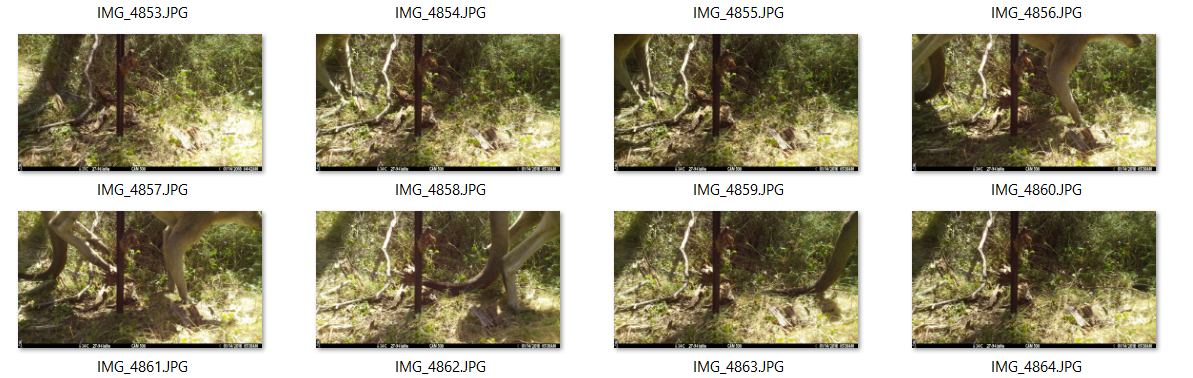
Figure 1 File Explorer Extra-large icon view of Kangaroo crossing camera Trap scene
IrfanView
The free image viewer/editor IrfanView behaves in a similar way to Windows Photos, only the images are not low-resolution versions and the screen does not turn black after a number of images have been displayed. The speed of display depends on the size of the input files. IrfanView does have a slideshow option, which displays images from a list for a specified period of time, but the slideshow cannot be paused and resumed.
DigiKam
Digikam is a free digital asset manager for Windows allowing addition of metadata to large collections of digital photographs which is suitable for manual inspection and tagging of images.
ExifPro
ExifPro 2.1 is an old, free, (but formerly commercial) Windows product for applying tags to members of collections of Windows photos.
HoneyView
The free, open source image viewer HoneyView from developer Bandisoft has a slideshow option that requires that all files appearing in it be selected (rather than selecting the containing folder), but the slideshow can be paused and resumed, or stepped forward or backwards, with a minimum display rate of 1 image per second. However, the slideshow cannot be started at an arbitrary point.
Dedicated Desktop Software
Software created for the express purpose of analysing camera trap provides integrated storage of data derived from image analysis, either as file metadata or a custom database. Creation of text or graphical reports may be supported, or export of data in a form suitable for the further analysis by statistical packages such as R or geographic information systems such as ArcGIS. Some of the available desktop products are reviewed below:
AddaxAI (6.19)
AddaxAI (from Dutch company Addax Data Science) is donationware which provides a multi-platform, Python-based interface to a large range of machine vision models for identifying animals in images, including SpeciesNet and can make use of Nvidia GPU-enabled computers for application of these models at much greater speed. It provides results as a JSON file, which can be loaded into other applications. A number of simple reporting features are included, such as sorting images containing identified objects into folders. Addax AI is not a packaged application and installation is fairly slow. The list of available models (often tailored to geographic regions) is frequently enlarged. Models have to be downloaded again if a new version is installed.
CamTrap Pro (3.2.184)
CamTrap Pro is a sophisticated, packaged Windows application (from Australian company Aleka Consulting) for processing camera trap datasets (both images and videos), making use of the recorded time for an image to distinguish multiple images of the same animal. It can install and access the results of machine vision software AddaxAI or use other analysis methods to detect the presence or species of animals in images as highlights, from which tags can be created either manually or automatically. Data can be displayed as a slideshow which can be paused and stepped either forwards or and started at an arbitrary point. Human analysis may be used to determine or refine the tag describing the species of animal present from highlighted images. Detections can be viewed in a separate, enlargeable window and Google Image search can be used to identify a detected animal where machine vision does not provide a correct answer. This facility is useful where the analyst is not familiar with the animals appearing the data. The algorithm used to detect similar images is probably the same as that implemented in sophisticated AI classifiers. Data can be viewed in CamTrap Pro by species detected as well as by camera, thus greatly speeding processing.
Animal details are stored as file metadata tags, allowing further analysis with Windows File Explorer. New tags (animals) can be added dynamically but there is an option to use a preset list. Added tags are stored as file metadata and detection data (highlights) from AddaxAI results are stored in the file name, making processed data easily portable between storage devices. CamTrap Pro’s use of image time data allows spurious detections from vegetation movement to be distinguished from animal detections and multiple images of the same animal or group of animals closely spaced in time can be accounted for. Data from multiple camera and epochs can be consolidated into text data suitable for inclusion in a report, or presented as a map.
CamTrap Pro is demoware (costing US$50-$90 for a permanent license). A free 30-day demo license is provided with each install with limits on the number of tags applied and files loaded. A detailed user manual (including instruction videos) is available. Free time-limited licenses are available to deserving clients.
Timelapse (v 2.4)
Timelapse is a free, open-source Windows product developed by Greenberg Consulting at the University of Calgary in Canada with similar capabilities to CamTrap Pro. Timelapse and CamTrap Pro are compared here. Operation is somewhat complex but functionality is very extensive. It can run and make use of AddaxAI machine vision software. Timelapse does not have internal reporting and although image attributes can be applied to groups of files, some user input of attributes is required. Image attribute data is stored in a database (including user-specified identifications), making movement of datasets between computers more complex, but use of a database rather than file metadata for storing image attributes gives speed and great flexibility.
Timelapse provides video resources to assist with installation and operation but users should have a reasonable level of Windows expertise and should be prepared to carefully read instruction screens and manuals before using the software.
Camelot (v 1.6.16)
Camelot is a free, open-source multi-platform Java application for camera trap data analysis from individual Australian software developers Heidi Hendry and Chris Mann. The product is associated with Flora and Fauna. It has a streamlined interface but appears immature in several respects and the reviewed release was made public 3 years ago. The lack of more recent updates may indicate a lack of support resources. Only manual identification is supported, but the application can be multi-user. There is some documentation on the product web site, but test data could not be loaded into the application via Bulk Import so its operation could not be tested. There is no email address for support but there is a community forum with a few questions posted each month.
CamTrap Detector (1.0.2)
CamTrap Detector is a free multi-platform packaged application which uses the Megadetector 5A machine vision model to detect human, animal and vehicles in images. It can make use of an Nvidia GPU running CUDA if present but installing it requires that the “Run anyway” option be selected from an unsigned application warning screen for Windows installations. Results can be exported as JSON or CSV files. There is an option to export images including or excluding specified entities to a folder. The interface is extremely simple, allowing only selection of the folder containing images to be processed. There is a video showing CamTrap Detector operation on the product web site but no help. The version number is not available within the application but is included in the installer file.
CamTrap Detector’s functionality is limited compared to AddaxAI – it can only use the Megadetector 5A model, whereas AddaxAI has a large number of models to choose from. It appears that it is intended for use with other analysis programs.
Summary
Web-based processing offers straightforward operation and access to AI recognition in some cases, but a reliable, high-speed internet connection is required, as well as preparedness to transfer large volumes of data.
Local processing with visual analysis using image or video display tools only can be used if the data has few false triggerings. Reporting requires separate software.
Where there are significant numbers of false triggerings, use of AI tools can filter out images not containing animals and in in some cases identify species. A computer with an Nvidia GPU greatly speeds processing. Such machines are commonly used for gaming. Addax AI and CamTrap Detector both offer AI filtering on multiple platforms. TimeLapse and CamTrap Pro both offer this functionality for Windows (via AddaxAI), together with refinement of AI results. CamTrap Pro includes text and map-style reporting, as well as exporting to GIS systems.
Add the first post in this thread.